
This article was updated on April 20, 2026
To write a CV, start by organizing your information into clear sections: personal details, professional summary, work experience, education, and skills. Use a clean format, write in reverse chronological order, and tailor your content to match the job you're applying for.
This guide shows you exactly how to write a professional CV step by step. Tools like MobiOffice make this easier with ready-to-use templates and familiar formatting that works across all devices.
What is a CV?
A CV is a detailed document outlining your complete academic and professional history. It includes work experience, education, skills, publications, awards, and other accomplishments. CVs are commonly used in academic, research, medical, and international job applications.
The main difference between a CV and a resume lies in length and purpose. A resume is a brief one-to-two-page summary tailored for specific jobs, while a CV provides comprehensive detail and can extend to multiple pages.
Understanding when to use each format matters. Academic positions, research roles, and international applications typically require CVs. Most corporate jobs usually ask for resumes. Always check the job posting to see which document the employer expects.
What should a CV include?
A good CV includes personal details, contact information, a personal statement or professional summary, work experience, education, and relevant skills. These sections form the foundation – everything an employer needs to evaluate your fit for the role.
Section
What to Include
Personal Details
Full name, phone number, email address, location (city/country)
Personal Statement
Brief summary of your background, key strengths, and career goals
Work Experience
Job titles, company names, dates, responsibilities, and achievements
Education
Degrees, institutions, graduation dates, relevant coursework or honors
Skills
Technical skills, software proficiency, languages, certifications
Additional sections depend on your field and experience. Academic CVs often include publications, research projects, and conference presentations. Career switchers might add volunteer work or professional development courses to show transferable skills.
How to write a CV step by step
Start with a blank document or template, then build your CV section by section following this clear sequence. MobiDocs offers a ready-to-use template for resume and cover letter, making it easy to create a professional CV that follows proper formatting from the start.
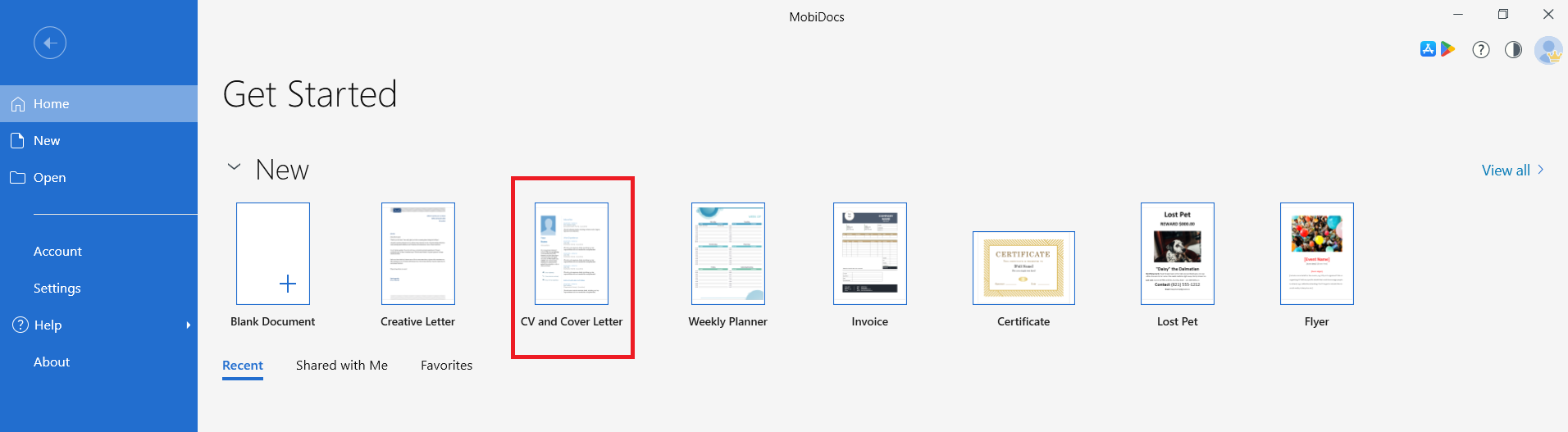
To use the CV and cover letter template in MobiDocs, follow these steps:
Open MobiDocs.
Choose CV and Cover Letter in the Get Started window, then click Create.
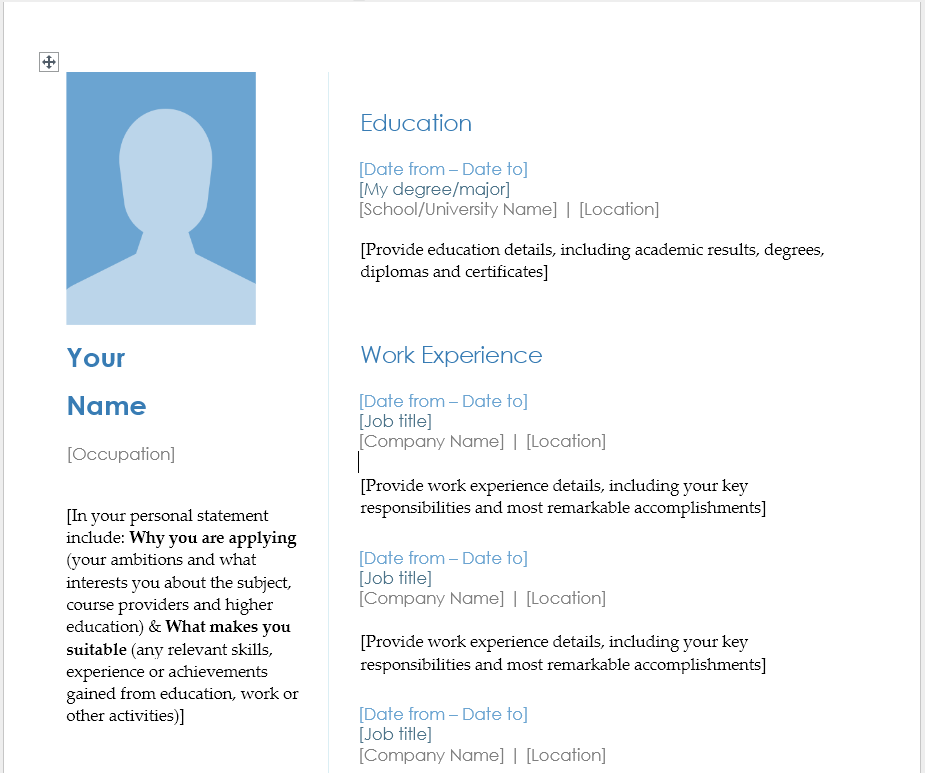
Add your personal details, photo (when required), summary, work experience, education, and relevant skills on the first page.
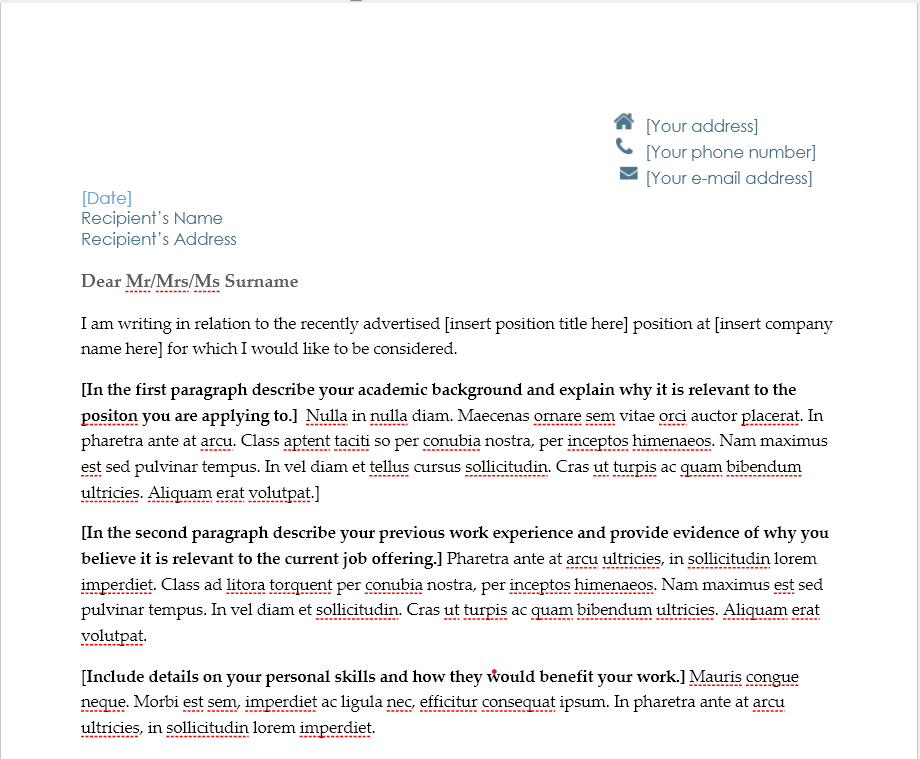
In the next page, create your cover letter using the guidance in the template.
Review your resume and cover letter for clarity, accuracy, and formatting consistency before saving.
This approach keeps your CV organized and ensures nothing important gets missed. Working with familiar tools like MobiDocs means you can open and edit any file format, making updates effortless whenever needed.
Ready to create your CV with templates that get you started right away?
Writing a strong personal profile
A strong personal profile captures who you are professionally in 3-4 sentences placed at the top of your CV. Focus on your current role or recent experience, key strengths, and what you bring to the position you're applying for.
Keep it specific and action-oriented. Instead of "hardworking professional," write "marketing coordinator with three years managing digital campaigns that increased engagement by 40%." Concrete achievements make your profile memorable and credible.
Tailor this section for each application. If you're applying to different types of roles, adjust your profile to highlight the most relevant experience. This shows employers you understand what they need and how you fit.
Listing work experience correctly
List your work experience in reverse chronological order, starting with your most recent role. For each position, include:
Job title
Company name
Location
Dates (month and year)
Then describe your responsibilities and achievements using clear, active language. Make each point count by starting bullet points with strong action verbs such as managed, developed, coordinated, or implemented. Also, quantify results wherever possible:
“Increased sales by 25%”
Instead of “Responsible for sales growth”
Numbers make your impact tangible and give hiring managers useful context.
If you're writing a CV with no experience, don’t leave the section empty. Focus on relevant alternatives, such as:
Internships
Volunteer roles
Academic projects
Part-time work
The structure stays the same, just shift the spotlight to transferable skills like teamwork, communication, problem-solving, and time management that employers value.
Highlighting skills and education
List skills that directly relate to the job you’re targeting, and group them logically to make them easier to scan. For example, you can organize them into:
Technical skills (software, tools, platforms)
Languages (with proficiency levels)
Certifications
Avoid vague terms. Be specific, for instance, Excel pivot tables is far more impactful than simply “Microsoft Office.”
When it comes to education, start with your highest qualification and work backwards. For each entry, include:
Degree name
Institution
Graduation year
Any honors or relevant coursework
If you're a recent graduate, it’s worth adding academic achievements or projects that demonstrate your skills and help strengthen your profile.
How to format a CV professionally
Professional CV formatting is all about clarity and consistency. Aim for a clean layout, balanced spacing, readable fonts, and clear section headers. As a baseline, follow these formatting essentials:
Use standard fonts like Arial or Calibri in 10–12 pt size
Keep margins at one inch
Use bold text sparingly for headings and job titles
Consistency matters just as much as the initial setup. Maintain the same visual style throughout your CV, for example:
If you bold one job title, bold them all
If you use bullet points in one section, apply them across similar sections
This attention to detail signals professionalism and makes your CV easier to scan.
Finally, think about how your CV will be viewed. Always save it as a PDF to preserve formatting across different devices and software. Word documents can appear differently depending on the viewer’s settings. With MobiOffice, this step is simple:
Create your CV in MobiDocs
Export to PDF with one click
Common CV mistakes to avoid
The most common CV mistakes include spelling errors, inconsistent formatting, irrelevant information, and generic language. Each error reduces your credibility and makes hiring managers question your attention to detail.
Mistakes that weaken your CV include:
Using overused phrases like "team player" or "hardworking" without evidence
Including personal information like age, marital status, or photo (unless required)
Listing outdated or irrelevant jobs that don't support your current career goals
Writing in first person ("I managed") instead of starting with action verbs
Forgetting to proofread – typos and errors create immediate negative impressions
How to update or edit an existing CV
To update your existing CV, you should do the following steps:
Review each section and add recent experience.
Removing outdated information.
Refreshing your personal statement or summary.
Review your work experience – add new roles, update responsibilities for current positions, and remove jobs from more than 10-15 years ago unless highly relevant.
Refresh your skills section to reflect what you've learned recently. Remove obsolete skills that no longer apply to your target roles.
Add new certifications, software proficiencies, or training programs.
Check formatting consistency after making changes.
Tools like MobiOffice make editing straightforward – compatible with major file formats, easy to use across all devices, and ready for any task without the learning curve of more complicated software.
Tips for making your CV stand out
Make your CV stand out by using specific achievements, action-oriented language, and tailoring content to each application. Here are key strategies that get results:
Use strong action verbs that demonstrate impact: achieved, delivered, streamlined, launched, negotiated.
Pair your action verbs with metrics whenever possible – numbers prove your claims and help employers visualize your contributions.
Pull keywords from the job description and naturally incorporate them into your CV where they genuinely apply to help with applicant tracking systems and shows you've paid attention.
Keep your CV clear and scannable by using white space effectively, breaking up text with bullet points, and putting the most important information where it's easily found.
Frequently asked questions
How long should a CV be?
A CV should be 1-2 pages for most professionals, though academic or research CVs can extend longer if you have extensive publications or projects. Focus on relevant experience – if something doesn't support your current career goals, leave it out.
What is the best CV format to use?
The reverse chronological format works best for most job seekers – it lists your most recent experience first and shows clear career progression. Use a functional format only if you're changing careers or have significant employment gaps.
Can I use the same CV for every job application?
No, you should tailor your CV for each application. Keep a master version with all your experience, then customize the personal statement and emphasize relevant skills and achievements for each specific role. This targeted approach significantly improves your chances.
How often should I update my CV?
Update your CV every 6-12 months or whenever you gain new skills, complete significant projects, change roles, or earn certifications. Regular updates keep details fresh and make job applications faster when opportunities arise.
Is a CV the same as a resume?
In most countries, CV and resume are used interchangeably. In the United States, a CV is longer and used mainly for academic positions, while a resume is a brief 1-2 page document for corporate jobs. Globally, CV is the standard term for job applications.
Writing a professional CV becomes straightforward when you follow a clear structure and focus on relevant achievements. MobiOffice gives you easy-to-use tools to create, edit, and update your CV – compatible with all major file formats, accessible across devices, and budget-friendly for everyone. Download MobiOffice today and get more done – create your perfect CV with templates and tools that work intuitively.