PDF Drive is a free PDF search engine offering more than 80 million eBooks for download. While it's generally legal to browse the site, downloading many of its books can be legally risky because a significant portion of the catalog may contain copyrighted works shared without permission. A safer option is using a legitimate PDF reader like MobiPDF with PDFs you own or download from legal sources such as Project Gutenberg, OverDrive, or official publisher websites.
This article was updated on October 22, 2026
Here's everything you need to know about PDF Drive's safety, legality, and the best alternatives available today.
Want a trusted PDF reader for legally sourced documents?
What is PDF Drive?
PDF Drive is a free search engine – think Google, but for e-books – that at the time of publication gives users access to more than 84 million books in various languages and genres, without ads or download limits. The platform offers an extensive collection of literature, ranging from classics to academic literature, comics, magazines, and even audiobooks. To top it all off, PDF Drive is entirely free to use and does not require an upfront registration. No wonder it’s so popular!
How to use PDF Drive
Searching for e-books on PDF Drive is straightforward and convenient. All you need to do is enter the title of the book, the author's name, or the book's subject, and the search engine will provide you with a list of books related to your search. You can then sort your search results according to page volume, language, or date of publication, or enable “Exact Match”, which will only bring out results that correspond to exactly what you’ve written in the search bar.
Derive more joy from reading. Give our slick & modern e-book reader a try.
In case you’re not looking for anything in particular, you can also browse content by categories: Fiction & Literature, Science & Research, Health & Fitness, Business & Career, and so on. There are even curated lists, such as “Editor’s Picks” or “Most Popular” to get you started. And should you not find anything you like no matter how you try, you can always request other users to upload a book for you through the “PDF Drive Hope” program, as long as you upload a few books yourself.
Is PDF Drive safe?
The website starts with "HTTPS," meaning it has an SSL certificate and is therefore technically safe. However, that is perhaps the only good thing that PDF Drive has going for it as this service, like most other free offerings on the web, comes at a hidden cost for its users. Here are some of the issues you need to consider if you’ve ever asked yourself the question of is it safe to download books from PDF Drive:
Potential malware hidden in PDF books. As much as the PDF Drive team tries to keep the place clean from bad actors, the fact that anyone can upload a book whenever they please means that at least a few might slip through the cracks. Luckily, the service supplies users with the original source link for each book, so always check it out and avoid downloading the file if you spot something fishy.
You need to have cookies enabled. While the website does not force you to sign up or to provide any personal information, it does use cookies, which allow advertisers to target you with relevant ads, so it’s best to set your browser to block cookies mode to keep your privacy in check.
Is PDF Drive legit?
A copyright minefield
When it comes to the legality of PDF Drive, this is a morally gray area. The website itself states that it does not host any copyrighted material and only provides links to other websites that offer PDF downloads. However, it is believed that some of the shared PDFs on PDF Drive violate copyright laws, which could put users at risk of legal action. PDF Drive emphasizes that they are aware of the importance of copyright and provide a means for copyright owners to take down content that infringes on their rights, but in any case, you should be double-checking everything before hitting that “Download” button.
All that being said, is PDF drive legal? Well, you are generally in the clear if all you do is read the downloaded PDF Drive book and don’t attempt to print it or share it with others. And as always, check the source URL to confirm or disprove the legitimacy of the PDF file you’re trying to download.
Low-quality e-books
Another aspect that some users question is the quality of the books available for download. While most of the files are of excellent quality, some eBooks contain errors, such as missing pages or scanned images that are hard to read. This could be due to the poor quality of the original source material or issues during the scanning process.
Frequent domain changes
Yet another cause for concern is the fact that the website has at some point changed its domain name from pdfdrive.net to pdfdrive.com, with some features, like its paid account plan, disappearing without a trace. These measures suggest that the website might have had a clash with the authorities before or has proactively taken action to avoid a conflict.
You can also stumble across other variations of the service online – for instance pdfdrive.to and pdfdrive.webs.nf – but whether these domains are owned by the original creators of PDF Drive is hard to tell, so it’s best to use the official site just to be on the safe side.
How to download books from PDF Drive
Obtaining PDF Drive books is just as easy as finding them. Once you find the book you want to read, simply click on the title. This should allow you to preview its contents or directly download it to your device. Most books on PDF Drive are available in PDF format, while others are available in MOBI and EPUB format or even as audiobooks.
Here’s the step-by-step process:
Open the PDF Drive website in your browser.
Search for the book you want to download. You can search by book title, author, or topic.
Click on the book to open a window with additional options.
Choose the format you want your book to be in: PDF, ePub, MOBI, or audio file.
Click on “Download” and go to your computer's "Downloads" folder to see the downloaded book.
For those of you who love to read on the go, PDF Drive also has an official app available for Android on Google Play.
How to read PDF Drive books
Whether you decide to cautiously download ebooks from the website or rely on a proven but paid PDF Drive alternatives like Amazon Kindle, you’ll need a good PDF viewer to make the most of your reading experience.
So, why should you grab a dedicated PDF reader instead of just using your browser?
Customizable interface. Dedicated PDF readers offer highly customizable interfaces that allow you to adjust things like text size, font, and more. Most PDF readers also provide page viewing options, such as single or double-page spread, full-screen mode, and page fit, which can further improve your reading experience.
Simplified search. Another significant advantage of using a dedicated PDF reader is the ability to search through large PDF books quickly. Most readers offer advanced search features that allow you to find specific words, phrases, or sentences within seconds, even in books with hundreds of pages.
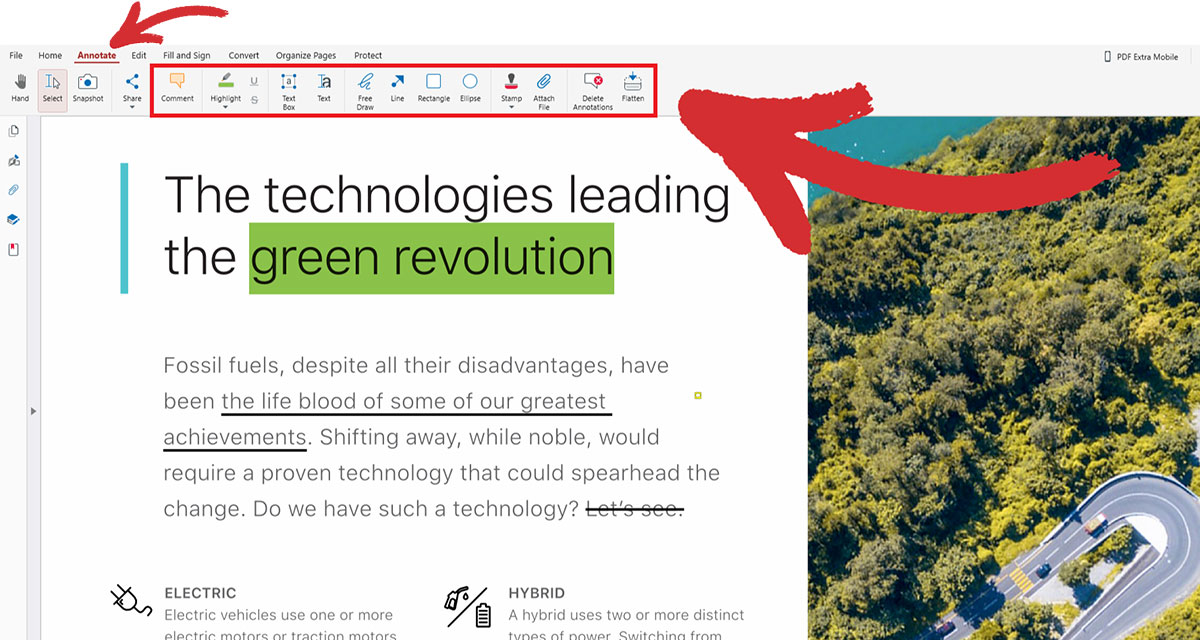
Annotation and markup tools. Unlike generic readers, dedicated PDF readers come with a wide range of PDF annotation tools, such as highlighters, underlines, strikethroughs, comment boxes, and bookmarks that allow you to mark up important text, add your notes, and save your annotations for later reference.
Here is how to elevate your reading hobby with MobiPDF:
1. Download the app for your Windows device.
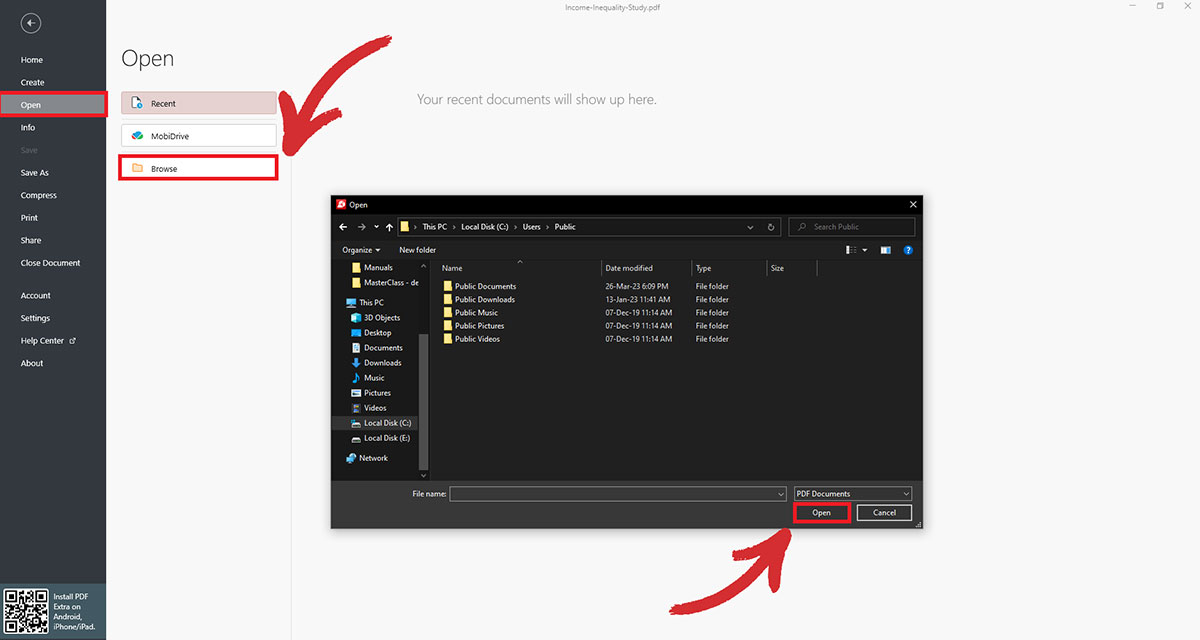
2. From the home screen, go to Open → Browse.
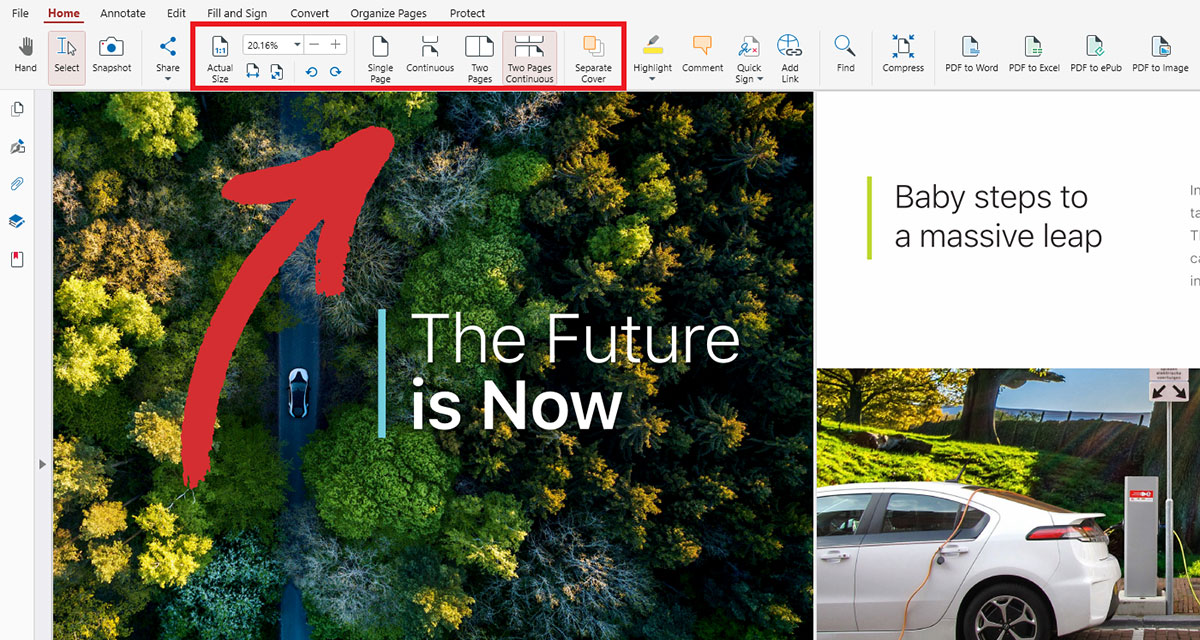
3. Zoom pages to actual size, play with custom zoom settings, or pick your preferred page display mode from the interactive ribbon above.
4. Add highlights and other annotations by clicking on the Annotate tab right next to Home.
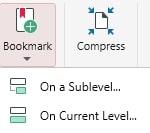
5. Bookmark a page for later by going to Edit. You can add primary bookmarks as well as secondary bookmarks for easier navigation.
Like what you see? Check our affordable pricing plans.
What replaced PDF Drive? Safer alternatives
PDF Drive hasn't disappeared, but it has changed domains multiple times over the years following copyright-related takedowns. Many users searching for "what replaced PDF Drive" are really looking for reliable ways to find and read PDFs safely. The best option depends on what you're trying to do. If you want classic books, public-domain libraries are ideal. If you're looking for recent titles, your local library is often the safest choice. And if you already have legitimate PDFs, a dedicated PDF reader gives you a much better reading and editing experience.
If your goal is simply to read, annotate, organize, or edit PDFs you've obtained legally, using a dedicated PDF application is both safer and more reliable than downloading files from questionable sources.
Ready to work with your PDFs instead of worrying about where they came from?
PDF Drive domain history
PDF Drive has operated under several domains over the years as copyright complaints and takedown actions have affected its availability. This is one reason users frequently believe the service has shut down when, in reality, it has simply moved to another address.
Some of the domains associated with PDF Drive include:
pdfdrive.com
pdfdrive.to
pdfdrive.webs.nf
Because these domains can change without notice, you'll often find outdated links in search results, blogs, and online discussions. This constant movement also makes it difficult to know whether you're visiting an official mirror or an unrelated copycat website.
If you're looking for a dependable long-term solution, relying on legitimate ebook sources and using a trusted PDF reader provides a far more stable workflow.
Frequently asked questions
PDF Drive itself still exists, though it changes domains frequently due to copyright takedown notices. As of 2026, the main domain is pdfdrive.webs.nf, but this may change again. If you're looking for stable, legal alternatives, Project Gutenberg offers public-domain books, OverDrive lets you borrow ebooks through participating libraries, and MobiPDF provides a reliable way to read and manage PDFs you've obtained from legitimate sources.
It depends on the specific book. PDF Drive includes both public-domain works, which are generally legal to download, and copyrighted books that may be shared without permission, which is illegal to download in many countries. Since there's no reliable way to distinguish them from the interface alone, it's safest to use legitimate public-domain libraries or purchase books from authorized publishers.
Final thoughts
Recently, PDF Drive has generated quite a bit of buzz since it’s free and simple to use, but not all of the hype is warranted. From copyright issues to viruses and broken files, users could easily make their day much harder if they’re not careful.
And while a legit (but paid) alternative like Amazon Kindle is a much-preferred choice, if you still want to take advantage of PDF Drive and its growing treasure trove of e-books, you can do so as long as you:
Double and triple-check the original source of the book to avoid malware
Run an antivirus software in the background as a second line of defense
Never do anything else with these books other than read them for your own leisure as printing and sharing any of the materials could make you liable for a lawsuit
Once you’ve got the book in your hands (so to speak), the next best move you can do is to grab a dedicated PDF reader like MobiPDF to make your reading experience seamless by accessing useful features, like page view modes, PDF annotations, quick search options, and the ability to add primary and secondary bookmarks. So, whether you're an academic researcher, a business professional, or just an avid bookworm, investing in a good PDF reader can pay off in more ways than one – try the app out and see for yourself!
If you'd rather spend time reading and working with your PDFs instead of questioning where they came from, choose a trusted PDF reader built for everyday use.