

The basics of pdf conversionAccessing the conversion menuConverting PDF to Word (DOCX)Converting PDF to Excel (XLSX)Converting PDF to Powerpoint (PPTX)Converting PDF to image (PNG and JPEG)Converting PDF to HTMLConverting PDF to ePubConverting PDF to RTFConverting files to PDFTips for getting great OCR conversions
Converting PDFs - PDF to image (PNG and JPEG)
Converting PDF to Image (PNG and JPEG)
Turning a PDF into image allows you to share your work in places that traditionally do not support the file format, like social media platforms. Of course, this is just one of the many examples of why it’s good to be able to turn PDFs into images.
Here is how this is done in MobiPDF:
1. Click on the  icon.
icon.
2. Choose if you want to export the document as a JPEG or PNG and set the desired output quality: Low, Medium, or High.
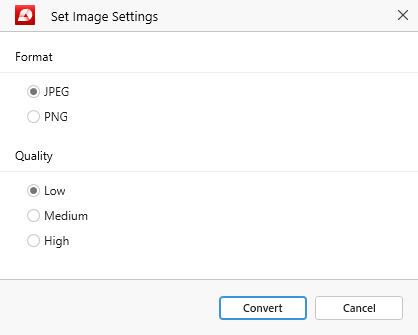
3. Click “Convert” to start the conversion process.
4. Your PDF is now made into a JPEG/PNG.
NOTE: MobiPDF supports two-way conversions (PDF → image and image → PDF).


