

The basics of pdf conversionAccessing the conversion menuConverting PDF to Word (DOCX)Converting PDF to Excel (XLSX)Converting PDF to Powerpoint (PPTX)Converting PDF to image (PNG and JPEG)Converting PDF to HTMLConverting PDF to ePubConverting PDF to RTFConverting files to PDFTips for getting great OCR conversions
Converting PDFs - The conversion menu
Accessing the Conversion Menu
Finding the PDF converter is simple. Here is what you need to do.
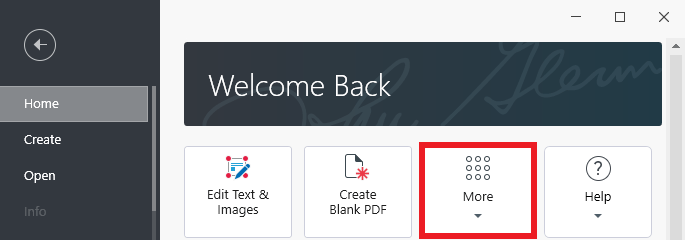
1. After launching MobiPDF, go to “Home → More”.
2. Choose the type of conversion you want to perform from the list of available options.
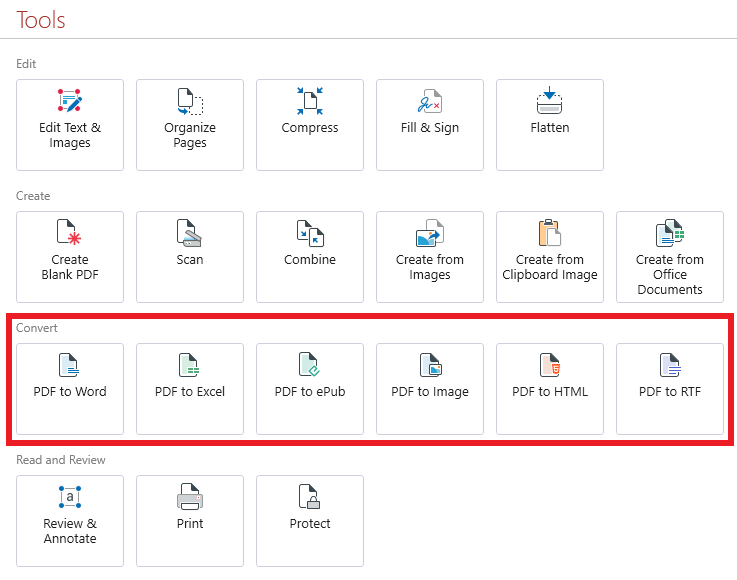
TIP: You can also access the same functionality by opening a PDF and clicking on the “Convert” tab in the upper ribbon.

3. If you accessed the converter from the “Home” menu, choose a file that you want to convert and where you want to save it on your device. In case you already have your document open, simply choose where you want to save the final output.
4. Enjoy your newly converted file!


