This article was updated on 3 February 2026
In 2026, presentations are no longer just slides, but the digital stage where ideas perform. The data in them tells stories, and visuals shape decisions. The right presentation software transforms scattered thoughts into a clear, persuasive narrative – and with so many tools on the market, choosing the best presentation software can feel overwhelming.
In this guide, we explore the best presentation software in 2026, what features matter most, and how to choose the right tool for your needs.
What to look for in the best presentation software
The best presentation software combines ease of use, strong design tools, and reliable compatibility to help you create clear, engaging, and professional presentations. It should support your ideas, not compete with them. When comparing tools, consider the following essentials:
Ease of use: An intuitive interface saves time and reduces frustration, especially for beginners and students.
Design flexibility: Templates, fonts, colour schemes, and layout options help you create visually appealing digital presentations.
Compatibility: Support for PowerPoint, PDF, and other major file formats ensures smooth collaboration.
Collaboration tools: Real-time editing, comments, and cloud sharing are vital for team projects.
Animation and transitions: Subtle motion can enhance storytelling when used thoughtfully.
Mobile and cross-platform access: Work seamlessly across Windows, Mac, Android, and iOS.
Presentation and delivery features: Presenter View, notes, and rehearsal tools improve confidence.
Security and support: Reliable updates and data protection matter for professional users.
The best presentation software in 2026
Below are some leading presentation software examples available today. They are not ranked in order, as the best choice depends on your goals and workflow.
MobiOffice
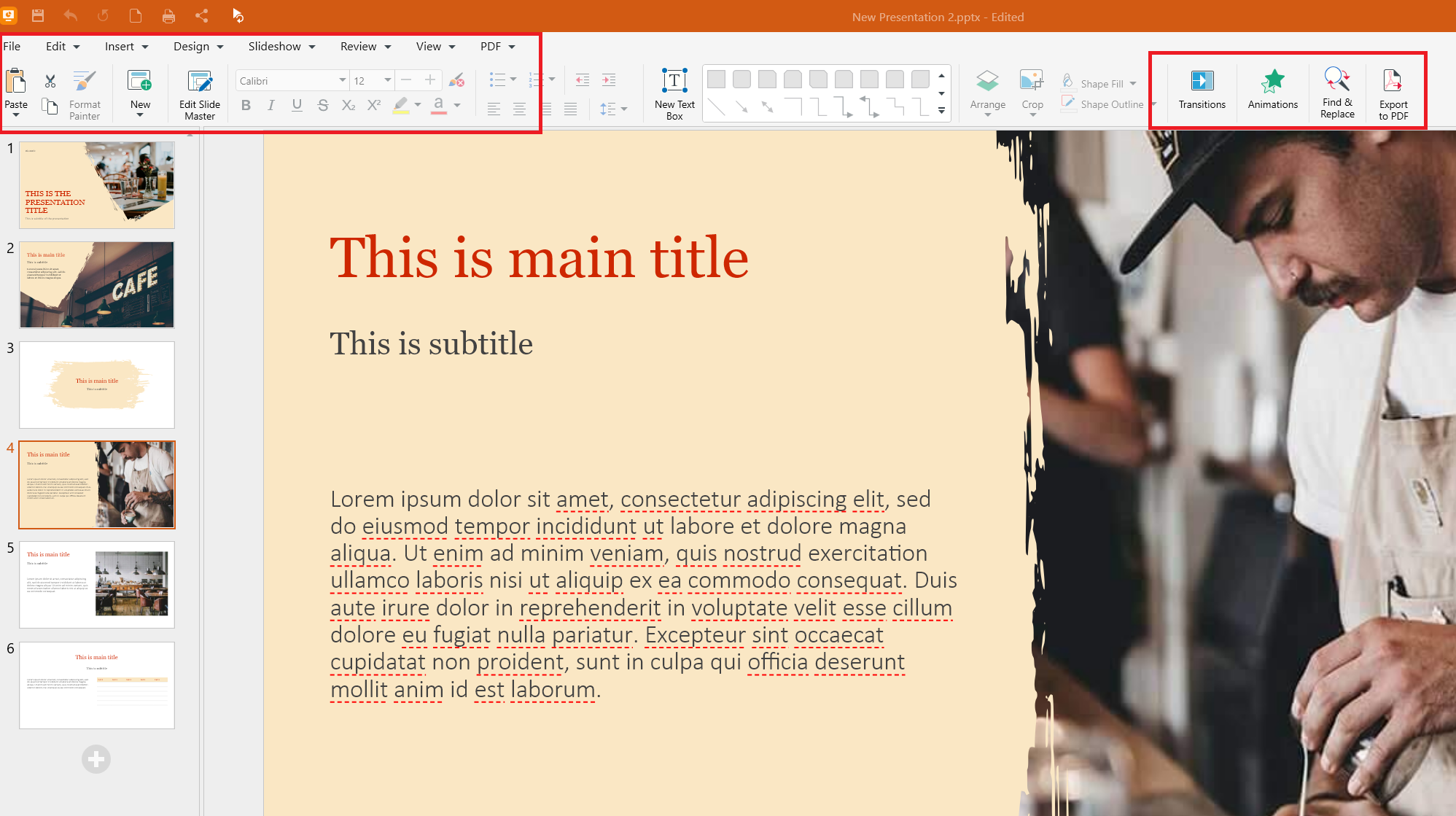
MobiSlides, as part of MobiOffice, is an easy-to-use and familiar PowerPoint alternative that helps you start working right away. It accompanies MobiDocs (document editing) and MobiSheets (spreadsheet software), making MobiOffice ideal for users who want an all-in-one productivity solution.
Key strengths:
Cross-platform support (Windows, Mac, Android, iOS)
High compatibility with Microsoft Office formats
PDF export and sharing options
Feature-rich free version
Affordable premium plans
Regular updates and customer support
MobiSlides is especially attractive for users who want professional results without subscription-heavy ecosystems. While the free version is suitable for many use cases, anyone needing more functionalities will need to upgrade to the Premium version, which is more affordable than many competitors.
Microsoft PowerPoint
Microsoft PowerPoint remains a global standard for digital presentations. It offers advanced design tools, deep integration with Microsoft 365, and enterprise-grade collaboration features. It is best suited for professionals and organizations already invested in the Microsoft ecosystem.
Key strengths:
Extensive template and theme library
Advanced animation and transition controls
Seamless integration with Word, Excel, and Teams
Real-time co-authoring and cloud storage via OneDrive
Strong enterprise security and compliance features
Wide compatibility and industry acceptance
Apple Keynote
Keynote is optimized for macOS and iOS users and is tightly integrated into Apple’s ecosystem. It is known for elegant templates, smooth animations, and high-performance graphics.
Key strengths:
Visually refined templates and cinematic transitions
Optimized performance on Mac, iPhone, and iPad
Easy collaboration through iCloud
High-quality export to PowerPoint and PDF formats
Free for Apple device users
Intuitive interface for creative professionals
Google Slides
Google Slides focuses on simplicity, accessibility, and collaboration. As part of Google Workspace, it enables users to create and edit presentations entirely in the browser. It is ideal for teams and students who rely on cloud-based workflows.
Key strengths:
Real-time collaboration and commenting
Automatic cloud saving in Google Drive
Easy sharing and permission controls
Cross-device access with no installation required
Integration with Google Docs, Sheets, and Meet
Free version with generous features
WPS Office Presentation
WPS Presentation offers a familiar PowerPoint-style interface with modern templates and animation tools. It appeals to users looking for a lightweight and affordable alternative.
Key strengths:
Interface similar to Microsoft PowerPoint
Built-in templates and design tools
Support for major file formats
Small installation size and fast performance
Free version with core functionality
Cross-platform availability
Canva
Canva blends presentation creation with graphic design, making it popular among marketers, educators, and content creators. Its drag-and-drop editor simplifies visual storytelling.
Key strengths:
Massive template and asset library
User-friendly drag-and-drop interface
Integrated stock photos, icons, and videos
Brand kits and design consistency tools
Cloud-based collaboration
Easy export for online and offline use
Prezi
Prezi offers a non-linear, zoom-based presentation format that moves away from traditional slide-by-slide storytelling. It suits presenters who want a more dynamic and visual approach.
Key strengths:
Zooming canvas for non-linear navigation
Strong storytelling and visual flow tools
Cloud-based access and sharing
Presentation analytics and viewer insights
Integration with video conferencing platforms
Distinctive presentation style
Beautiful.ai
Beautiful.ai uses artificial intelligence to automate layout, spacing, and design choices. It is designed for users who want polished results with minimal manual formatting.
Key strengths:
AI-powered slide design automation
Consistent layouts and branding controls
Smart templates for common use cases
Cloud collaboration features
Time-saving content formatting
Enterprise-ready options for teams
Zoho Show
Zoho Show integrates with the wider Zoho productivity ecosystem and supports browser-based presentation creation. It is suitable for distributed teams and remote collaboration.
Key strengths:
Real-time co-editing and commenting
Cloud storage and sharing tools
Integration with Zoho CRM and apps
Support for PowerPoint file formats
Web-based access without downloads
Free plan for individual users
Polaris Office
Polaris Office is a mobile-first productivity suite with strong cloud synchronization. Its presentation tool is designed for users who frequently work on mobile devices.
Key strengths:
Optimized mobile experience
Cross-device cloud syncing
Support for Office file formats
Good interface for quick edits
Integrated document, sheet, and slide tools
Offline editing capabilities
LibreOffice Impress
LibreOffice Impress is a free, open-source presentation tool that offers deep customization and offline functionality.
Key strengths:
Completely free and open-source
Extensive customization options
Offline access and local file control
Support for multiple file formats
Large community and regular updates
No subscription or licensing fees
Haiku Deck
Haiku Deck emphasizes visual storytelling and simplicity. It focuses on minimal text and strong imagery to help presenters communicate ideas clearly.
Key strengths:
Clean, minimalist slide layouts
Curated royalty-free image library
Focus on visual-first storytelling
Web-based access
Quick presentation creation for beginners
Should you try AI presentation software?
Artificial intelligence is reshaping how presentations are created. Many platforms now offer AI-powered features that generate slide layouts, suggest visuals, rewrite text, or even build full decks from prompts.
Benefits of AI presentation tools
Faster creation through automatic slide generation
Smart layout optimization
Content and headline suggestions
Design consistency across decks
These features make AI tools attractive for users who need quick results or lack design experience.
Limitations to consider
Limited customization in some tools
Generic design outputs
Privacy and data concerns
Dependence on prompts and training data
Best AI presentation software in 2026
The market now includes solutions aimed at different audiences:
Best free AI presentation software: Entry-level tools offering basic automation
Best AI presentation software for enterprise: Platforms with advanced security, branding, and team management
Other considerations when choosing presentation software
Before making a final decision, think about:
Your typical presentation format (linear, interactive, multimedia)
Audience size and setting
Internet availability
Long-term costs
Learning curve
Integration with existing tools
These factors help narrow down the best presentation software for your specific workflow.
Frequently asked questions
How do you make a presentation visually engaging without overloading the slides?
Focus on clarity and balance. Use one main idea per slide, limit text, choose consistent colors, and rely on visuals such as charts and icons to support your message.
What are the best ways to make an interactive presentation that keeps attention?
Incorporate polls, clickable elements, short videos, audience questions, and storytelling techniques. Interactive tools and live feedback features also help maintain engagement.
How should a slide deck be structured from title slide to conclusion slide?
A strong structure includes a clear title slide, agenda, problem statement, key points, supporting evidence, summary, and a final call to action.
What are the best PowerPoint alternatives for creating modern presentations?
Popular alternatives include MobiSlides, Google Slides, Keynote, Canva, and Beautiful.ai. Each offers different strengths depending on design needs and collaboration style.
How do you choose the right presentation software for different use cases (students, business, churches)?
Students benefit from easy-to-use and free tools. Businesses should prioritize collaboration and security. Churches and community groups often need affordability, multimedia support, and simple sharing options.
Choose the right tool and elevate your presentations
In 2026, the best presentation software is the one that fits your goals, skills, and audience. Whether you prefer classic tools, cloud-based collaboration, or AI-powered assistants, today’s options offer more flexibility than ever. If you are looking for a balanced, reliable, and affordable solution, MobiSlides is the best choice.