

Using the translation tools
MobiMail includes built-in translation so you can read messages in other languages. This guide shows you how to translate an email, add languages for quick translation, and set your default translation language in MobiMail on Windows. These tools help you communicate clearly across languages without leaving your inbox.
Note: MobiMail is available on Windows only.
Before you begin
Make sure you have:
MobiMail installed on your Windows device. MobiMail installs as part of MobiOffice.
An email account set up in MobiMail. See the Introduction to MobiMail.
An internet connection, which translation requires.
Translate an email
MobiMail can translate a message into another language so you can read mail from international contacts.
1. Open MobiMail.
2. Click the email you want to translate.
3. Click the Translate button in the main ribbon to translate the message into your default language. You can also right-click in the email and choose Translate from the context menu.
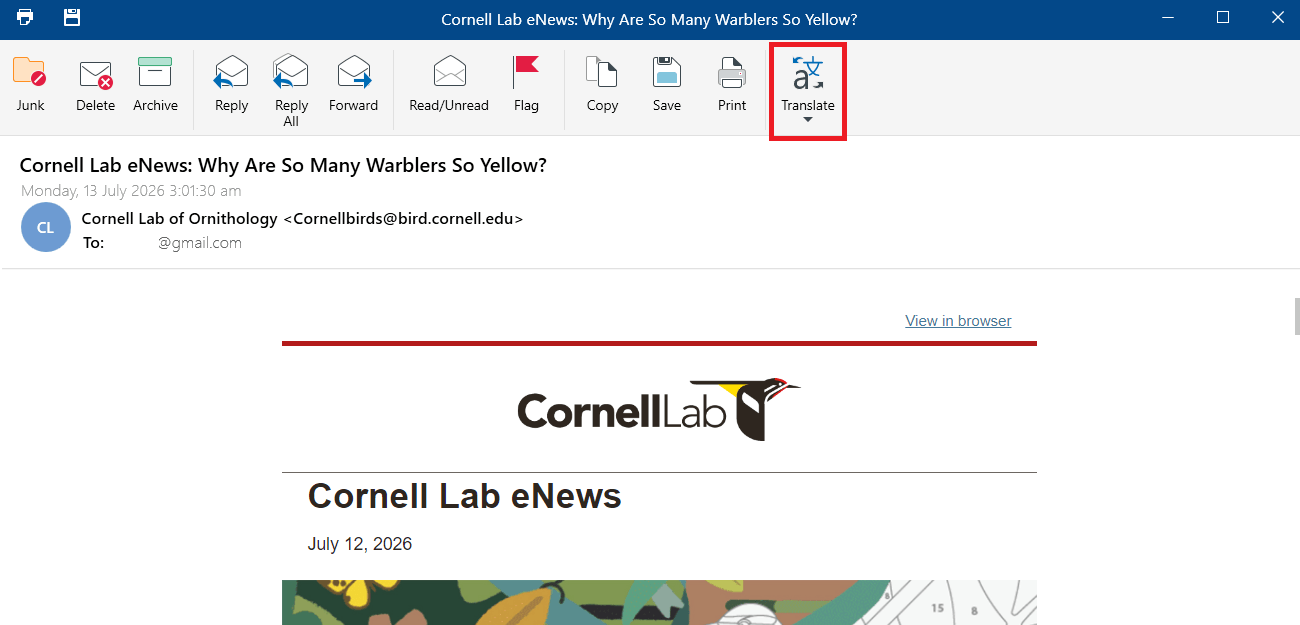
4. To switch back to the original, click Translate again.
Add languages for quick translation
Add the languages you use most so they're ready in the Translate menu.
1. Click the Translate button dropdown.
2. Hover over the default language, then click More Languages.
3. Select the languages you want to add, then confirm with OK.
Change your default translation language
1. Click the Translate button dropdown.
2. Click Translation Preferences.
3. Select the language you want from the language dropdown, then confirm with OK.
Tip: You can also set the default translation language in File > Settings > MobiMail Preferences > Mail, under Translation.
Troubleshooting
My spelling isn't being checked, or the wrong language is used. Set your language in File > Settings > General Preferences, then reopen your message.
The Translate button doesn't work. Open or select an email first. The button acts on the message you have open.
A translation won't load. Check your internet connection, since translation needs one to work.
I want to see the original message. Click Translate again to switch back from the translated version.
Where to go next
You now know how to check your writing and translate messages in MobiMail. Try one of these next:


