The basics of pdf conversionAccessing the conversion menuConverting PDF to Word (DOCX)Converting PDF to Excel (XLSX)Converting PDF to Powerpoint (PPTX)Converting PDF to image (PNG and JPEG)Converting PDF to HTMLConverting PDF to ePubConverting PDF to RTFConverting files to PDFTips for getting great OCR conversions
Converting PDFs - Converting files to PDF
Converting Files to PDF
With MobiPDF, you can create PDFs from over 30 popular file formats. This is useful for archival purposes or when you want to be certain that your file’s original formatting will be preserved on any device and operating system.
Below is the complete list of currently supported file formats:
Images: AI, AVIF, BMP, DNG, GIF, HEIC, JPEG (JPG), JXL, MPO, PNG, PPM, PSD, SVG, TIF (TIFF), WEBP, XCF
Documents: HTM (HTML), ODP, ODS, ODT, RTF, TXT, XLS (XLSX), PPT (PPTX), DOCX (DOC)
E-books: AZW (AZW3), CBR (CBZ), EPUB, FB2, MOBI
To create a PDF from any of the file formats above:
1. Launch MobiPDF.
2. Go to “Create” → “From File”.
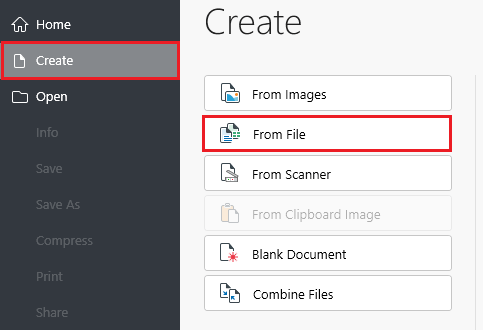
3. Choose the file you want to turn into a PDF.
4. Wait for the conversion process to finish.